
IMPORTANT: For Windows 7 users, please download and install Microsoft .NET Framework 3.5 first before doing the instruction below.
- On the search bar at the lower left, type Registry Editor. Run the app.
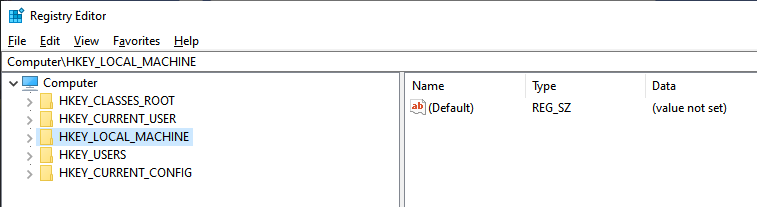
- On the address bar, type this or paste.
Computer\HKEY_LOCAL_MACHINE\SOFTWARE\WOW6432Node\Microsoft\Internet Explorer\Main\FeatureControl\FEATURE_BROWSER_EMULATION
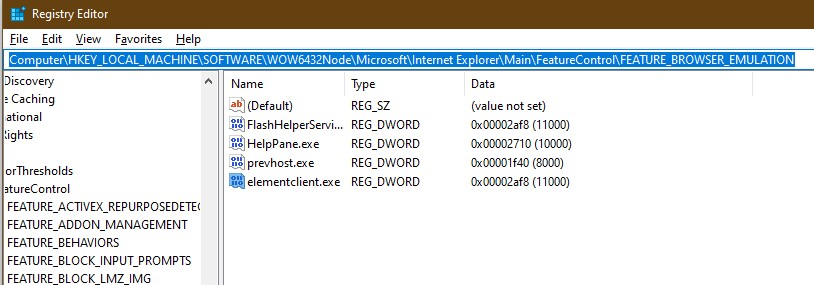
- Right Click at the open area.
- Click NEW then choose DWORD (32-bit) Value and set the name as elementclient.exe
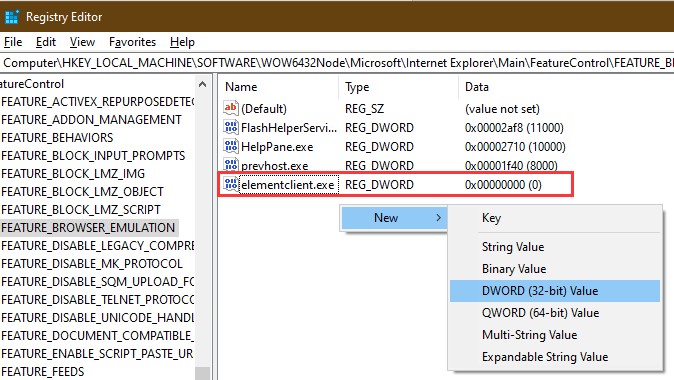
- Right-click the value, modify, and put the following details:
Value Name: elementclient.exe
Value Data: 00002af8
Base: Hexadecimal
- Restart the client and try to login again. Cheers!